
The whole platform
17 modules on shared data, and the layer under them.
One page, every module: what it does, its screens, its walkthrough, and a session with the assistant beside it. One permission model, one audit log and one MCP server sit under all of them.
Instead of a stack of accounts
What you run today, and what it becomes.
One login, one permission model, and a project, a person and a month that mean the same thing everywhere.
Projects & work
Projects · Wiki · Tasks · Datasets · Apps
Projects, tasks, project knowledge, the data your automations write, and the mini-apps your team runs on it all.
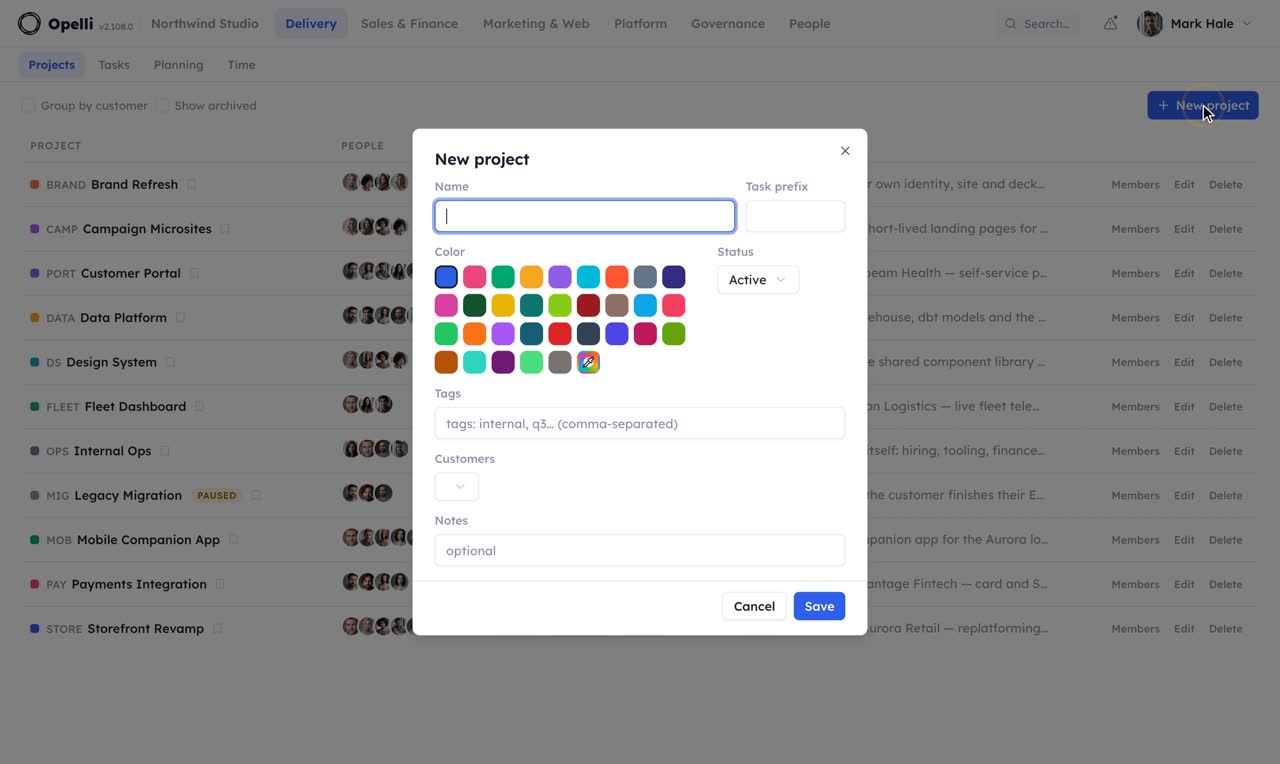
Projects
The whole project on one page.
See the team, capacity, time, deadlines, tasks, customer context and project knowledge in one place.
Compare planned and tracked time before the project runs over budget.

create_projectUsed set_project_memberUsed create_wiki_pageCreated AUR2 with both of them as members and a "Proposal" page holding the accepted scope. The page is private to the project until you share it.
planning_project_summaryUsed tracking_project_summaryPlanned 240 h, tracked 154 h so far, burn at 64 % with nine days left. Two milestones on track, one slipped a week.
The project wiki
Where the work gets written down.
Every project has a wiki for meeting notes, decisions and product briefs — written together, connected to tasks and shared only where you choose.


- Collaborative project knowledgeEdit pages together and keep meeting notes, decisions and product briefs in one place.
- Turn decisions into workCreate linked tasks directly from meeting notes.
- Share only what a client needsGive guests access to selected pages without exposing the rest of the project.
- Discuss work in contextComment on exact passages and keep the conversation with the source material.
- Use rich content without lock-inAdd diagrams, tables and files, then import or export in Markdown.
 1:38
1:38The wiki is part of the Projects walkthrough.
find_in_wiki_pageUsed edit_wiki_pageFound it under "Decisions". Added the line right after; the edit is one exact replacement, so nothing else on the page moved.
list_wiki_pagesUsed api_requestShared the "Onboarding" subtree with the guest. They see those pages and nothing else in the project.
Tasks
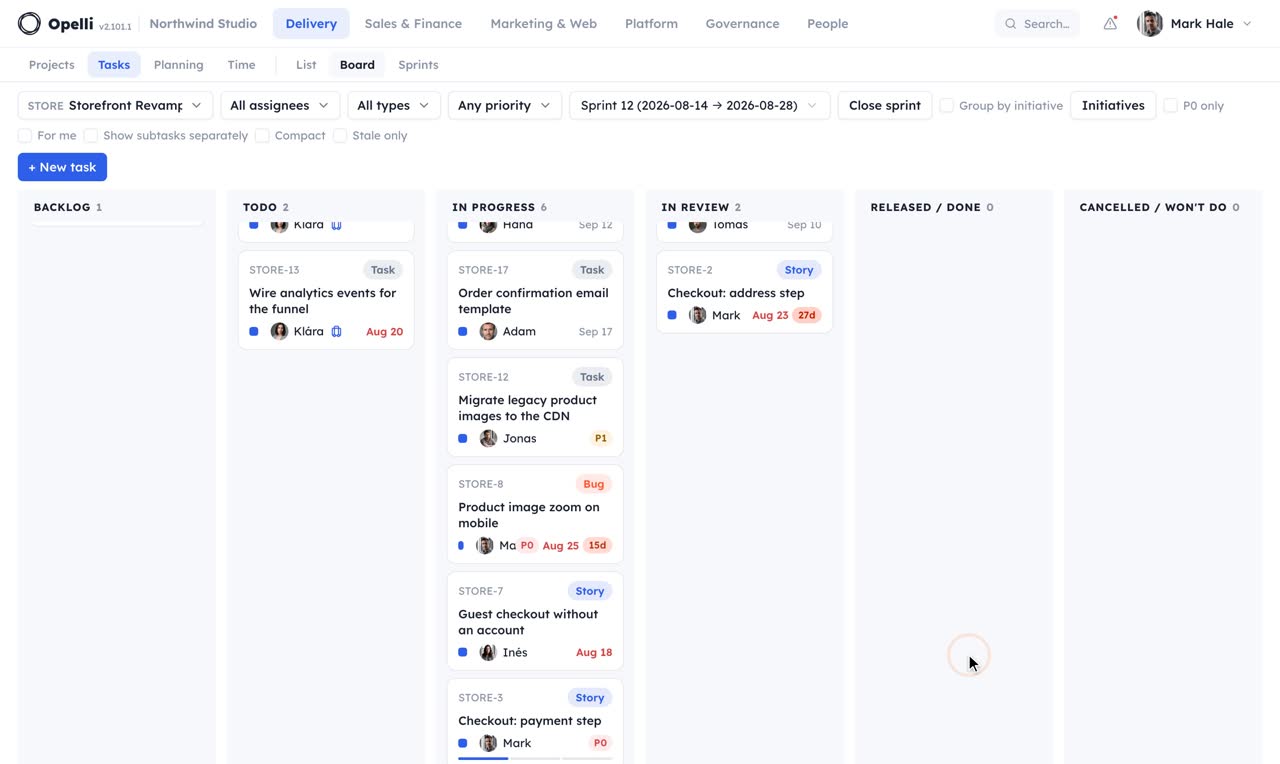
A board that stays small.
Types, six statuses — "Won't do" is an answer too — one assignee and one level of subtasks. Small enough that the board stays a view of the work.


Compact mode fits the whole sprint on one screen.

- A focused task boardTrack status, priority, ownership and deadlines without turning the board into a second job.
- Plan in sprintsKeep current work together and carry unfinished items forward.
- Connect code and workLink GitHub activity to the tasks it belongs to.
- Keep the contextFiles, comments and linked wiki pages stay with the task.
get_wiki_pageUsed create_taskFour tasks, STORE-131 to STORE-134, each linked back to the note. Two are Mira's, one Nina's, one yours.
update_taskDone. Mira got the P0 message and the board shows the blocked chip.
Datasets
A row a day, next to the roadmap.
Some of the numbers a team lives by are written by machines — the app's store figures every morning, a monitor checking the site every five minutes, an assistant reporting what it read overnight. Each gets a dataset under its project, appends one row at a time, and the wiki shows the history as a live table or chart.


POST /datasets/12/rows
Authorization: Bearer opds_…
Idempotency-Key: ios-2026-08-22
Content-Type: application/json

{ "timestamp": "2026-08-22T06:30:00+02:00", "platform": "ios",
  "installs": 113, "dau": 3359, "crash_free_pct": 99.8, "rating": 4.4 }

→ 201  { "inserted": 1, "duplicates": 0, "ids": [4471] }
- Append, never re-uploadEvery record is one row added with one request — there is no file to fetch, edit and put back, so two writers can never overwrite each other. Send an Idempotency-Key and a retried request is stored once.
- A token that can do one thingEach dataset has its own ingest token, and all it can do is append rows to that dataset. Rotate or revoke it from the dataset page, which also hands you the curl, RouterOS and Python snippets ready to run.
- Free-form, or declaredRows are JSON. Declare the columns and their types and a malformed record is refused with the key named; leave them undeclared and the dataset takes what comes — an uptime monitor's status and response time, say.
-
Profiled, charted, in the wikiThe dataset opens on a
column profile — type, count, a histogram or the most common
values — above a table that sorts and filters on any column and
a time range, a chart of the numeric columns, and JSONL, CSV or
JSON exports. Save a sort, filters and a chart as a named view,
then type
/datasetin a page to embed it: it reads the current rows every time the page opens, and stays as private as the page. - Written by an assistant, tooA scheduled assistant that scans the news, social media and research papers each morning appends what it found — source, title, relevance — and the team reads the table in the wiki. The same goes for a CI job, a router or a sensor: anything that can make one request can keep a dataset.
- Bounded on purposeA dataset keeps up to 100 000 rows and ages old ones out on the retention you choose. A secret download link for a dashboard outside Opelli is off until you switch it on, and says plainly what holding it means.
Ask for it
From the day's rows to a chart on the page.
Your assistant finds the dataset, reads the month out of it, saves what it read as a named view and puts that view on the wiki page — as a live chart that keeps growing with each morning's row.
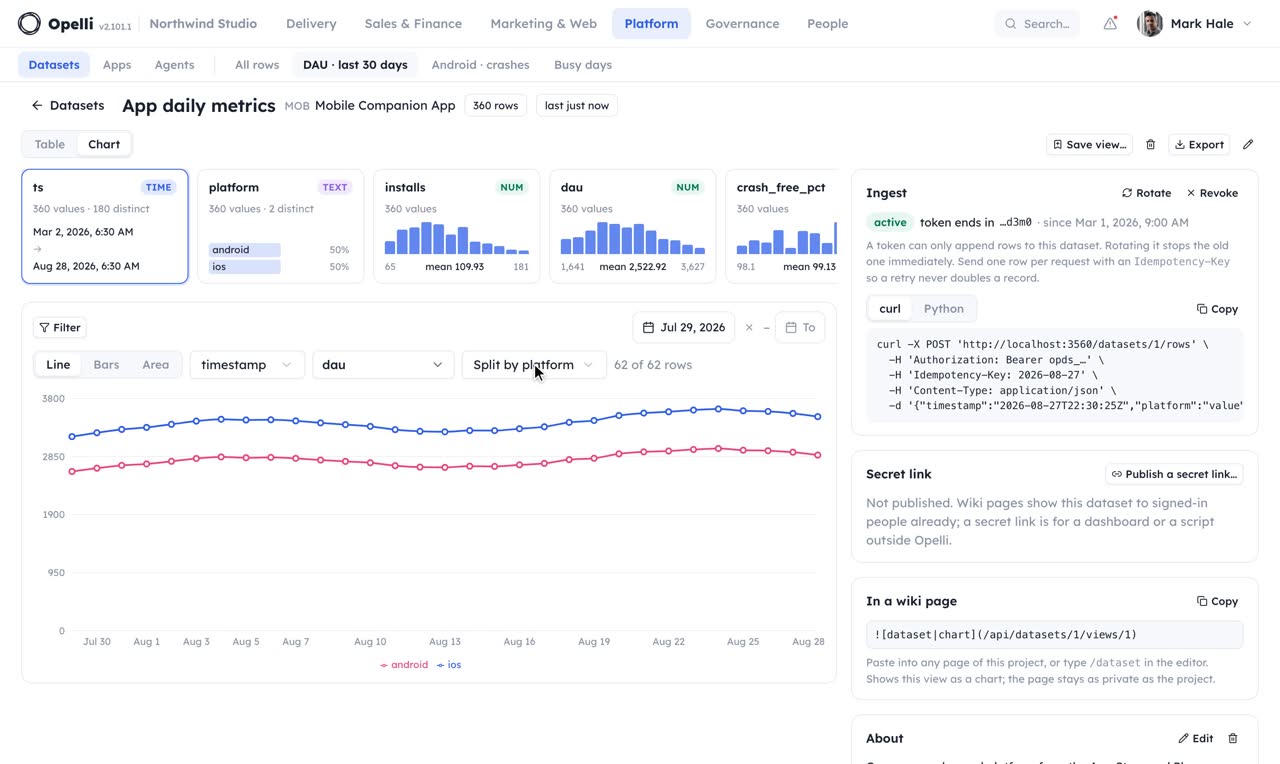
query_dataset_rowsUsed dataset_statsAndroid averaged 4 210 daily actives, up 6 % on the previous week. Crash-free sessions held at 99.4 %.
save_dataset_viewSaved. It is a tab on the dataset now, and /dataset in any wiki page can embed it.
Apps
The tool your team built, running inside Opelli.
Some tools are yours alone — a wall of the numbers your datasets already hold, a screen for the kitchen, an estimator nobody else would want. Upload the built app, or let your assistant write it, and it opens for signed-in members right in Opelli: versions, rollback, storage and sign-in already taken care of.


- Versions, never edits-in-placeAn upload is a numbered version and nothing changes for the team until you press Publish. Every earlier version keeps a Roll back button, so a bad release is one click old.
- Project-wide or org-wideAn app belongs to a project and opens for its members — or to the whole organization. External guest accounts never see it either way.
- Runs as the person using itAn app runs with each viewer's own sign-in, so what it can read and change is exactly what that person could anyway — a dashboard over a dataset shows each member their own permitted slice, with no credentials anywhere in its code. Publishing asks for one consent in return: publish only what you wrote or reviewed. Every publish is recorded in the security trail.
- State without a backendApps that need to remember things get built-in storage: per-person state for drafts and preferences, shared state for a board everyone sees — saved on the server, with concurrent updates handled safely.
- From GitHub on every pushThe app page hands you a ready-made CI snippet: push to main, and the build lands as a new version — published only when the workflow says so, with an API key that can touch apps and nothing else.
- Your assistant builds it end to endA connected assistant can create an app, read its source, make edits, stage a version and publish — the same loop it uses for microsites, now for internal tools.
Ask for it
From a sentence to a tool the team opens.
Your assistant creates the app, writes its files and publishes the first version — a wall for the kitchen screen that reads people, plans and tickets as whoever opens it, ready before anybody asks where the numbers live.
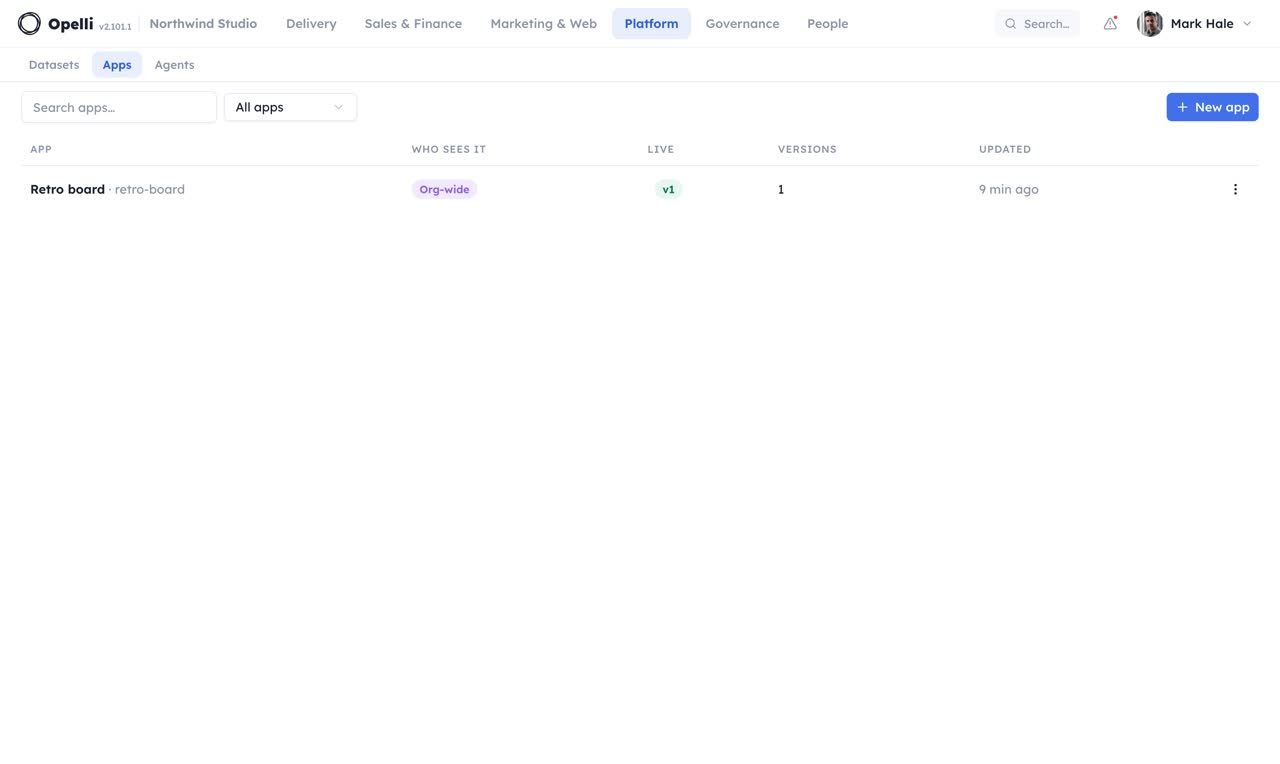
create_appUsed write_app_filesStaged as version 1 of "Studio wall", org-wide, unpublished. It reads the dataset as whoever opens it, so nobody sees more than they could anyway.
publish_appLive. Every publish is in the security trail, and the earlier version keeps its Roll back button.
Planning & people
Planning · Time · People
Plan capacity, track time and approve monthly timesheets.
Planning
Who works on what, at a glance.
See capacity and conflicts across the team, then adjust the plan directly in the schedule.
- Plan in hours, days or FTE while Opelli keeps one consistent view of capacity.
- Use monthly limits for flexible contractors without forcing artificial project splits.
- Open an initiative on the Roadmap to see its stories, bugs and tasks on the sprints they are planned for — drag one to another sprint, plan the next sprint in a click, add work right there.

The Roadmap: an initiative opened to its tasks, each on the sprint it is planned for.

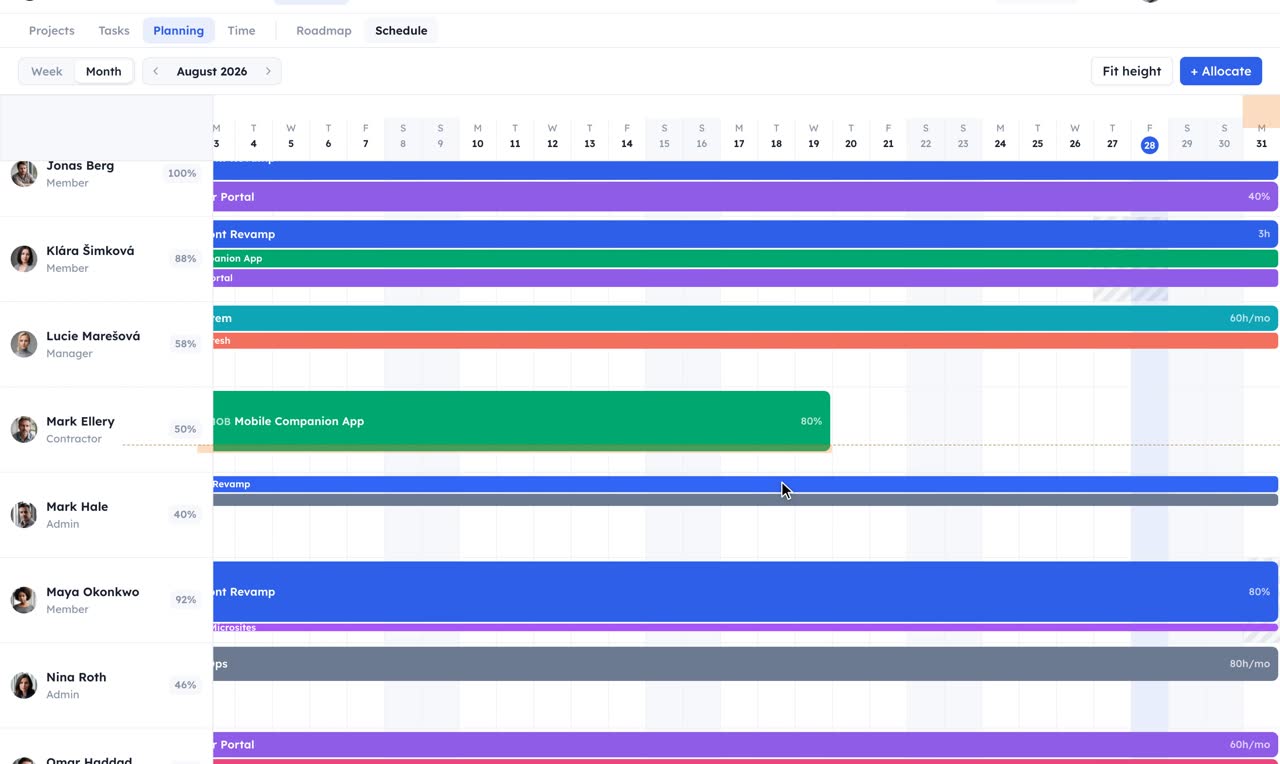
list_allocationsUsed list_time_offMira at 118 % and Tomáš at 106 %. Lucie is out 13 to 17 October, which the schedule already shows as a striped band.
update_allocationUsed create_allocationMira is at 84 % now, Petr at 74 %. Both bars moved on the schedule and the change is in the activity log.


Time
Track the week, close the month.
A calendar for the week's work and a list for the numbers. Turn approved time into an invoice without retyping.
- Log time manually or turn calendar events into project entries with your assistant.
- Compare planned and tracked time by person, project and month.
- Submit monthly timesheets for approval and lock approved periods.
- Connect calendars and Toggl, or export the month for further processing.
- Keep time correct for teams working across time zones.
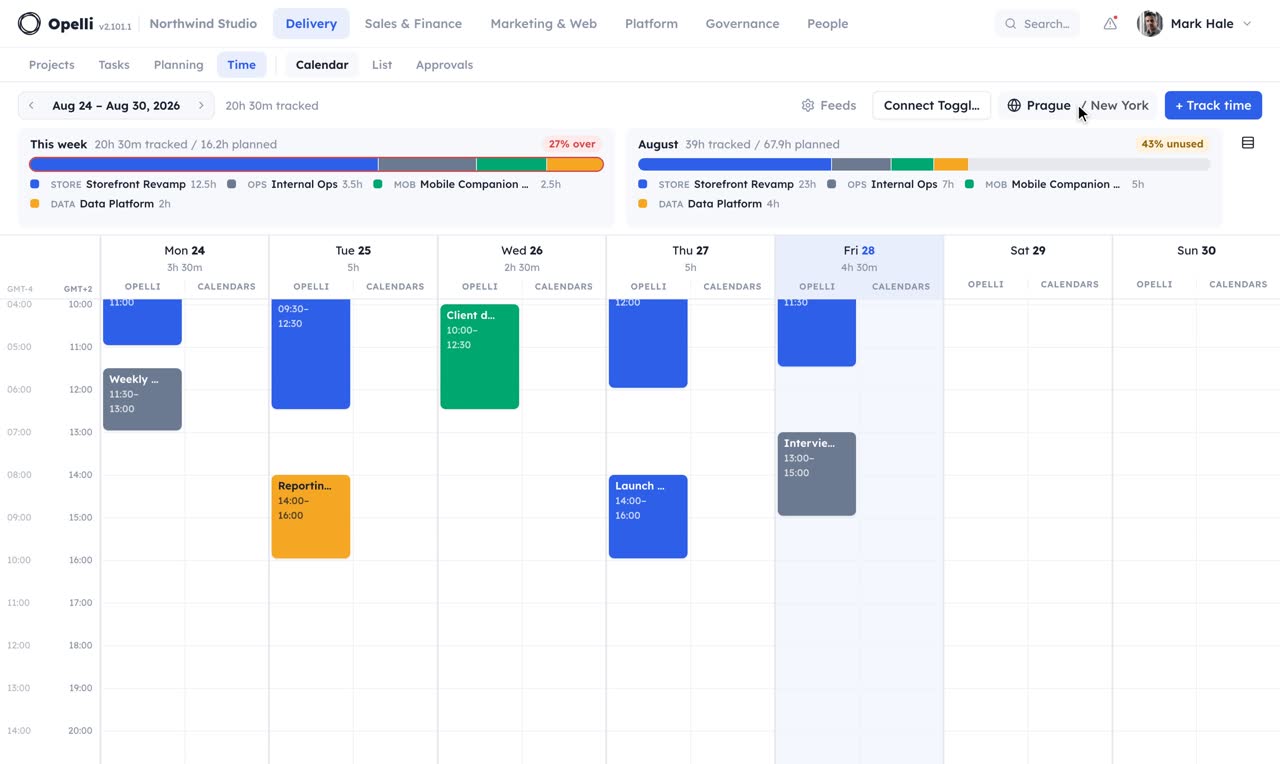
start_timerUsed list_time_entriesTimer running since 09:41. Yesterday: 6.5 h on Storefront Revamp, 1 h on Internal Ops, all billable.
api_requestSent, one statement per project, to each project's Time reviewer. You can withdraw until they act.
People
A directory connected to real work.
See each person's projects, capacity, tasks and tracked time together.


- View the team as a list, by project or in an org chart.
- Manage profiles and time off where the team already works.
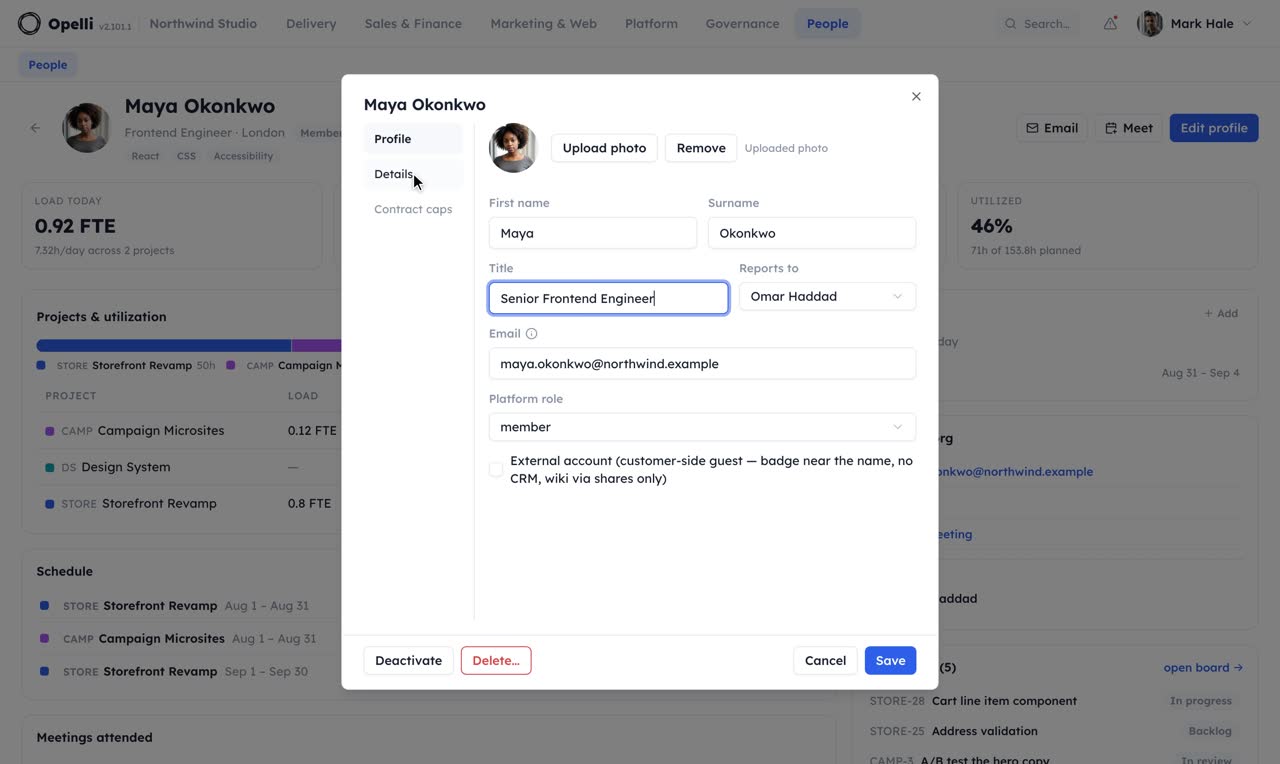
list_peopleUsed list_allocationsMaya and Adam list it. Maya is at 92 % in November, Adam at 60 %.
create_time_offBooked. It shows on his profile, the schedule and every task card that names him.
Sales & finance
Customers · Orders · Finance · Marketing · Sites · Forms
CRM, orders, invoicing, campaigns, sites and forms.
Customers
A pipeline that remembers.
Keep every customer, conversation and opportunity in one place, with a clear next step for each deal.
- See pipeline conversion, time in stage and win rate without rebuilding the report in a spreadsheet
- Look up Czech companies through ARES when creating a customer
- Amounts are shown only to users with the right permission


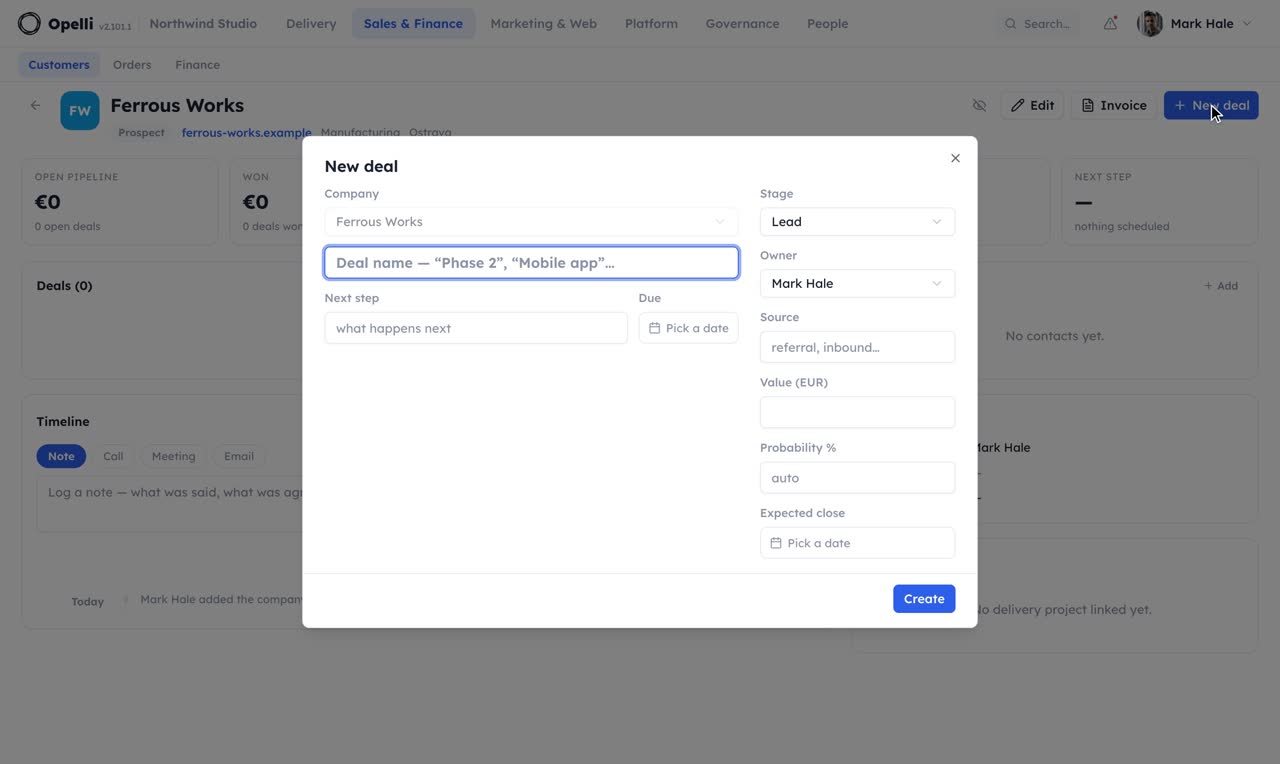
list_mail_queueUsed file_mailUsed read_entry_with_agentOne message from Charles, filed on Aurora Retail. Summary: they accept the phase-two scope. Next step proposed: revised proposal by Friday. New name: Lucy Marsh, marketing lead.
update_dealUsed create_crm_ruleDeal moved. Rule "No next step, 7 days" is active and runs once a day; it fires once per stall.
Orders
Sell it, and take the money for it.
Share an order page where customers can choose, enter billing details and pay without creating an account.


- Payments through your StripePayments go directly to your connected Stripe account.
- From order to deliveryTrack orders, delivery and subscriptions in one place.
- Financial details stay protectedAccess to financial data is controlled by permissions.
What is still being billed, grouped by customer — seats and add-ons on one card even when they run on different periods.

It closes the loop the rest of this page opens. The deal is won in Customers, the order is placed and paid here, and Finance issues the invoice for it — over one set of customers, one set of permissions and one audit trail.
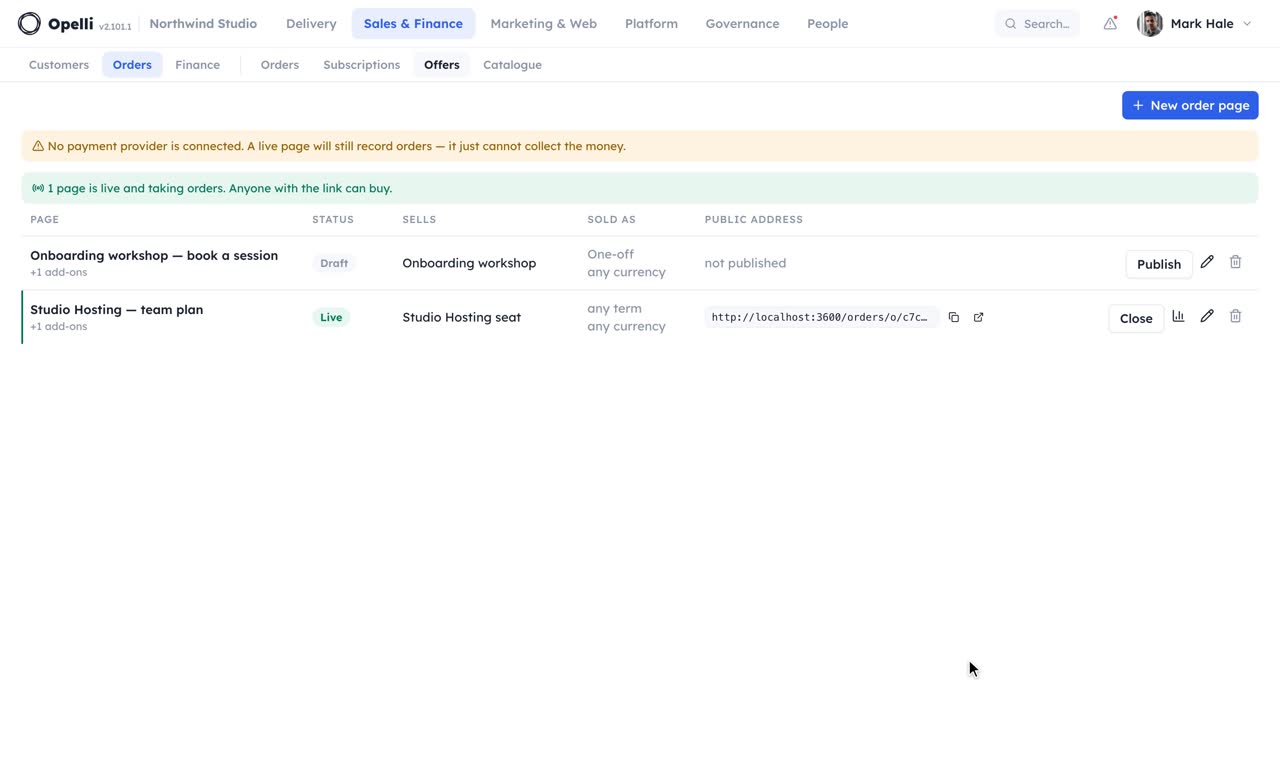
list_ordersUsed traffic_summaryStudio Hosting: 9 paid of 31 who reached checkout. Onboarding workshop: 4 paid, no drop-off after checkout. Both counted per person, no cookies.
update_order_fulfilmentDone, both. The buyers can see it on their order pages.
Finance
The month's hours, as an invoice.
Turn approved project time into a ready-to-issue invoice with Czech tax details and a payment QR code.
- Use the right historical rate automatically and see revenue, cost and margin by project
- Create recurring drafts for retainers and review them before issue

Billing and cost are separate permissions — a bookkeeper can run invoicing end to end while cost rates and margins stay with the people who set them.

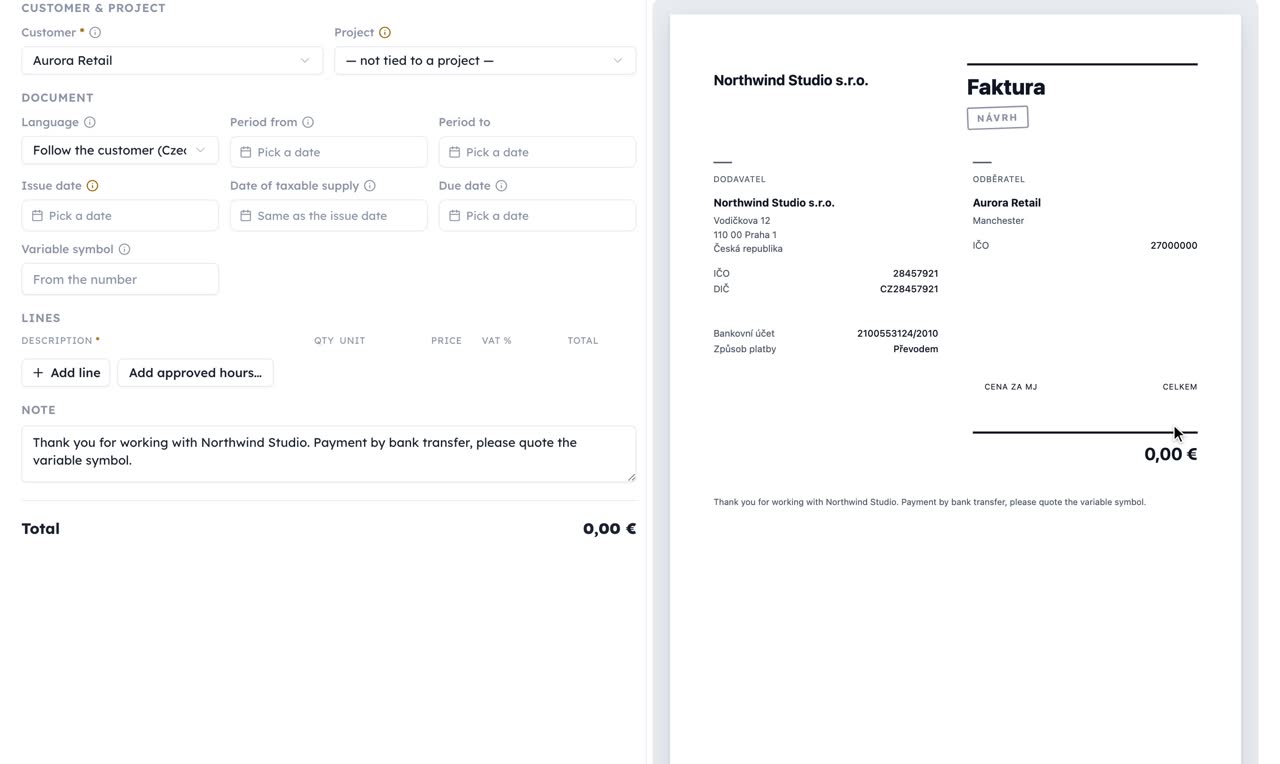
api_requestDraft created: four lines at the August rates, Czech document, QR payment code, due in 14 days. Issuing allocates the number, so I stop here until you say so.
api_requestUsed download_invoice_isdocIssued as 2026-091 and emailed with the PDF, ISDOC embedded. The bare ISDOC file is attached.
Marketing
Campaigns, from the same context.
The people you'd write to are already in the CRM, and the voice you'd write in is already on file.

- Campaigns in contextBuild messages from the contacts and brand material already in Opelli.
- Personalize before you sendPreview the subject and message with real recipient data.
- Reusable designsCreate a consistent email style without editing code.
- Clear results and lasting opt-outsFollow campaign performance and respect an unsubscribe across every list.
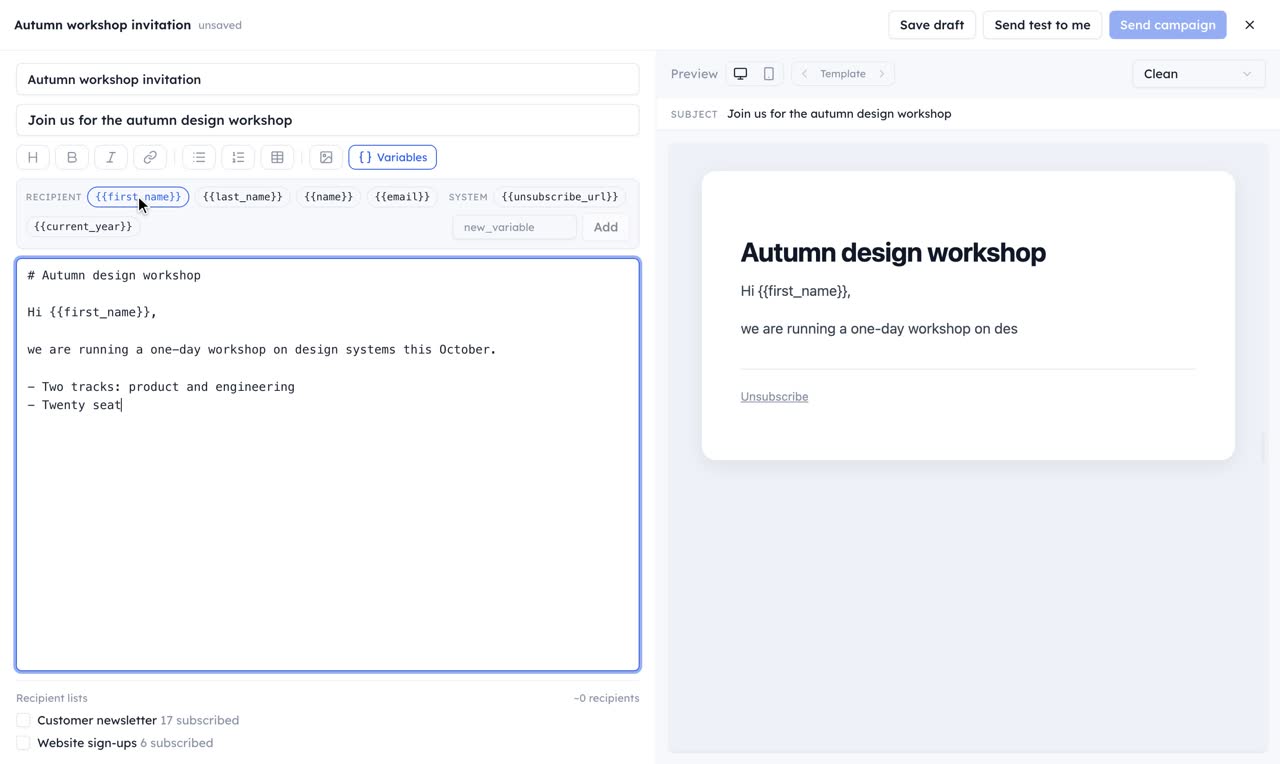
list_tone_guidelinesUsed get_wiki_pageUsed create_campaignDraft saved with three sections and a first-name variable. 1 940 subscribed recipients on the list. Nothing is sent until you press send in Opelli.
list_form_responsesUsed add_list_membersAdded 212 addresses under "loyalty". Duplicates and unsubscribed ones were skipped.
Sites
The page your campaign points at.
A small marketing site sits beside the project it belongs to — a launch page, a webinar sign-up, a one-pager for a customer.
- Create a campaign page from the material already in the project.
- Preview every version and publish only when it is ready.
- Use your own domain and connect sign-ups directly to the project's forms.
- Return to an earlier version whenever you need to.
- See how many people the page reached — counted without cookies, so nobody is identified.

Every answer is a new version. Publishing is one button — and so is going back to the one before.

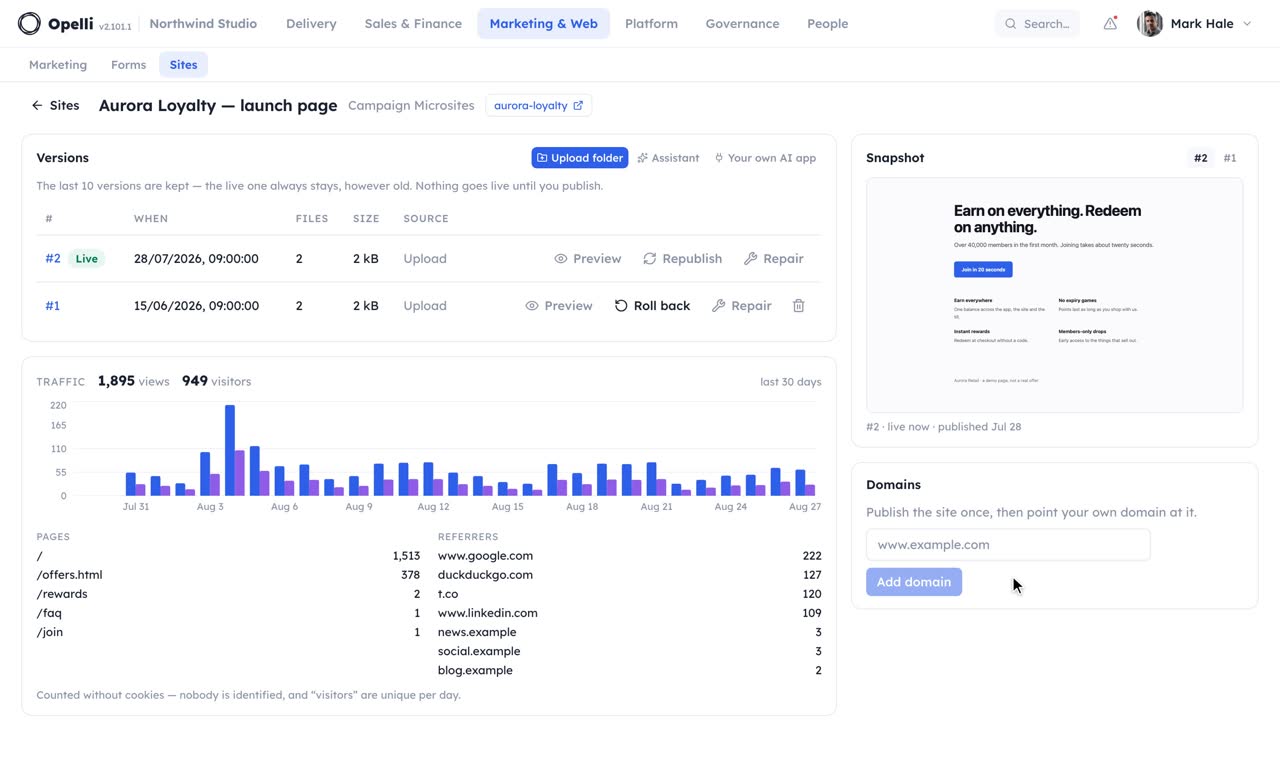
get_wiki_pageUsed create_siteUsed write_site_filesStaged as version 1, unpublished, preview attached. The copy comes from the brief's "What members get" section.
publish_siteUsed traffic_summaryLive on its built-in address; your domain is one DNS record away. I will read the traffic tomorrow: visits and visitors, no cookies.
Forms
Ask the outside world.
Questionnaires, polls and sign-up pages. Build the questions, share the link.


- Ask it your wayChoose from six question types and match the form to your brand. Mark any question as required and change its order.
- You control intakeOpen and close intake when you choose.
- Results as they arriveCollect responses without requiring an account and see results as they arrive.
- No visitor trackingNo visitor tracking is stored with responses.
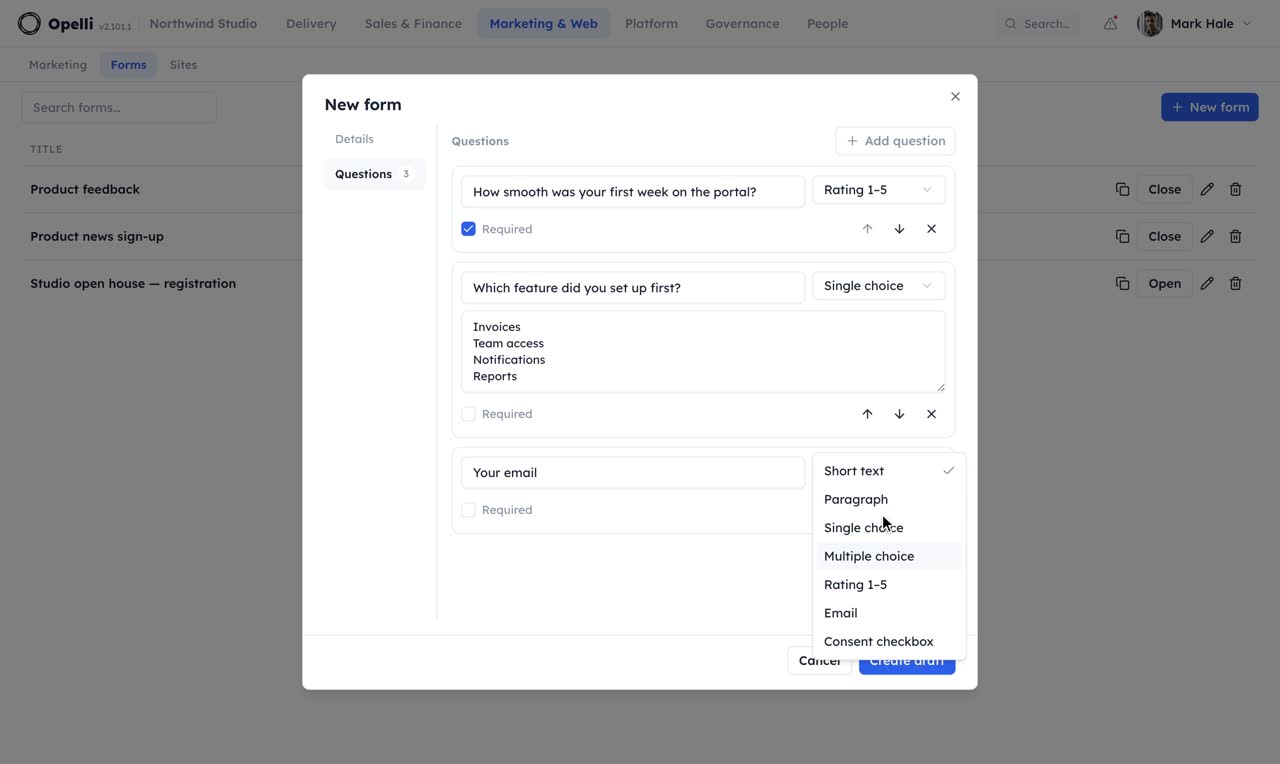
create_formUsed open_formOpen at its public link. Ratings and the consent tick land in the ledger; the email question is what a reply can be sent to.
form_summary14 responses, rating average 4.6, eleven left a comment. Two asked for a follow-up session.
Security & control
Access · Security · Governance · Signing
Permissions, security, compliance, audit records and signed documents.
Access
Share the work without oversharing.
Every feature carries a permission level — none, read, write, delete — set per role or per person. Access can be limited to records from the projects a person is a member of.

- Documented, not impliedEach feature spells out what every permission level allows, right where you assign it.
- Roles & overridesAdmin, manager, member and guest out of the box; custom roles and per-person exceptions when you need them.
- The guest boundaryCustomer-side guests are labelled everywhere, see only the wiki pages shared with them and can never enter CRM or Finance — no permission grant can change that.
- Two money permissionsWhat you pay someone and what you charge for their time are granted separately, so invoicing can be delegated without opening cost data.
- Locked monthsAn approved timesheet locks its month — no silent edits after sign-off.
- Personal connectionsScripts and assistants connect through personal, module-scoped keys that act only as their owner. Revoke any connection at any time.
Part of the platform under every module; see the walkthroughs of the modules it protects.
whoamiUsed list_endpointsYou are Mark Hale on Northwind Studio. This key reaches projects, tasks, wiki, time, customers and sites. Nothing under finance or people's pay; a path absent from the list does not exist for this key.
api_requestRefused: finance is outside this key's scope. Widen the key in Settings → API keys if that is intended.
Security
Built for audits.
The commitments that matter when you buy: where your data lives, how it is protected and how sign-in works.
- Isolated by organizationEach customer's data is kept in a separate environment.
- Protected in transit and at restApplication data and files are encrypted and processed in the EU.
- Use your identity providerSign in with Google, or Microsoft Entra under an enterprise arrangement, and keep 2FA under your control.
- Recoverable by designAutomated backups support recovery from accidental loss.
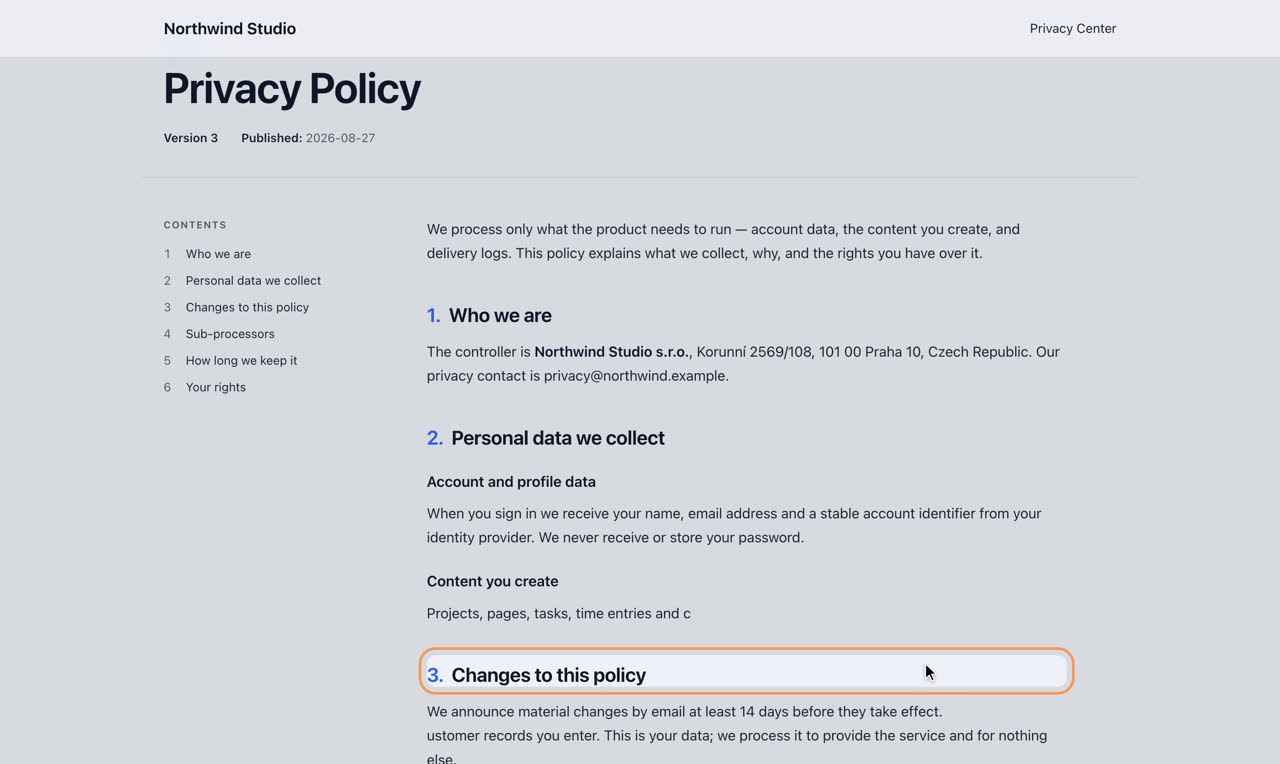
The GDPR machinery you'd ask about — consent records, subject requests on a 30-day clock, a map of where personal data sits — is in the product itself.
Part of the platform under every module; see the walkthroughs of the modules it protects.
api_requestEvery session on every device is ended on your next action. Key management never answers to a key, so rotating it is yours to do in Settings → API keys; the new one is shown once.
Compliance & Audit
Everything on the record.
Two modules for the questions customers, auditors and investors eventually ask: what your legal texts say and who agreed to which version — and what actually happened here last month.
Compliance
Your GDPR posture, run like the rest of the company.
Terms, a privacy policy, consent texts — drafted in Markdown and published as immutable versions to a Privacy Center at your own address. The exact text someone agreed to stays reproducible forever, and old versions stay linkable.
- A consent ledger: who agreed to what, which version, when — every consent with its own withdraw link
- Data-subject requests with the 30-day clock counting down, from the public portal or logged by hand
- A locator that finds a person's email across CRM contacts, mailing lists, form responses and accounts
- "Manage my data": a private link listing someone's consents and requests — no account, no way to probe who's in the system
- Each document belongs to a project and picks the look of its public page

Audit
What happened, and the report of it.
Every notable thing lands in one org-wide activity log — tasks closed, deals moved, people added to projects, pages published, campaigns sent. Read it as a day-by-day stream, or render the same range as one Markdown document and mail it.
- Everyone sees their own slice, filtered by the permissions they hold and the projects they belong to
- Lose access to a project and its history goes with it, immediately
- Summaries name things, never values — no deal amounts, no phone numbers
- An admin-only security trail: roles, permission changes, keys minted and revoked
- A delivery record of everything Opelli sent, in the same stream
- The same document a connected assistant asks for when it wants to know what changed

…and the same range, rendered as one Markdown document you can copy or mail.

 2:10
2:10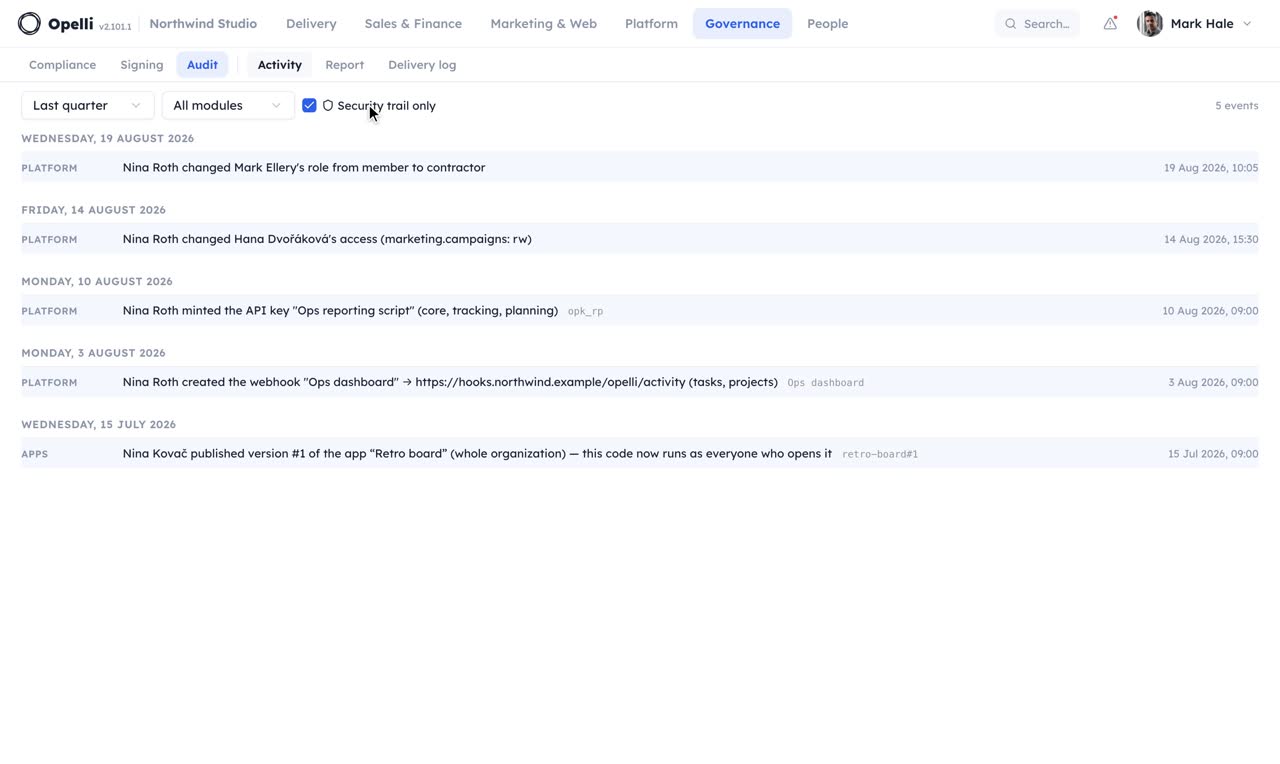 1:11
1:11locate_personal_dataUsed export_personal_dataFound her in Customers, two form responses and one consent. Exported as one Markdown file; the download is logged.
generate_reportHere it is: one Markdown report, only the rows you are allowed to see, grouped by module and project with the hours rolled up.
Signing
Counter-sign the contract they sent.
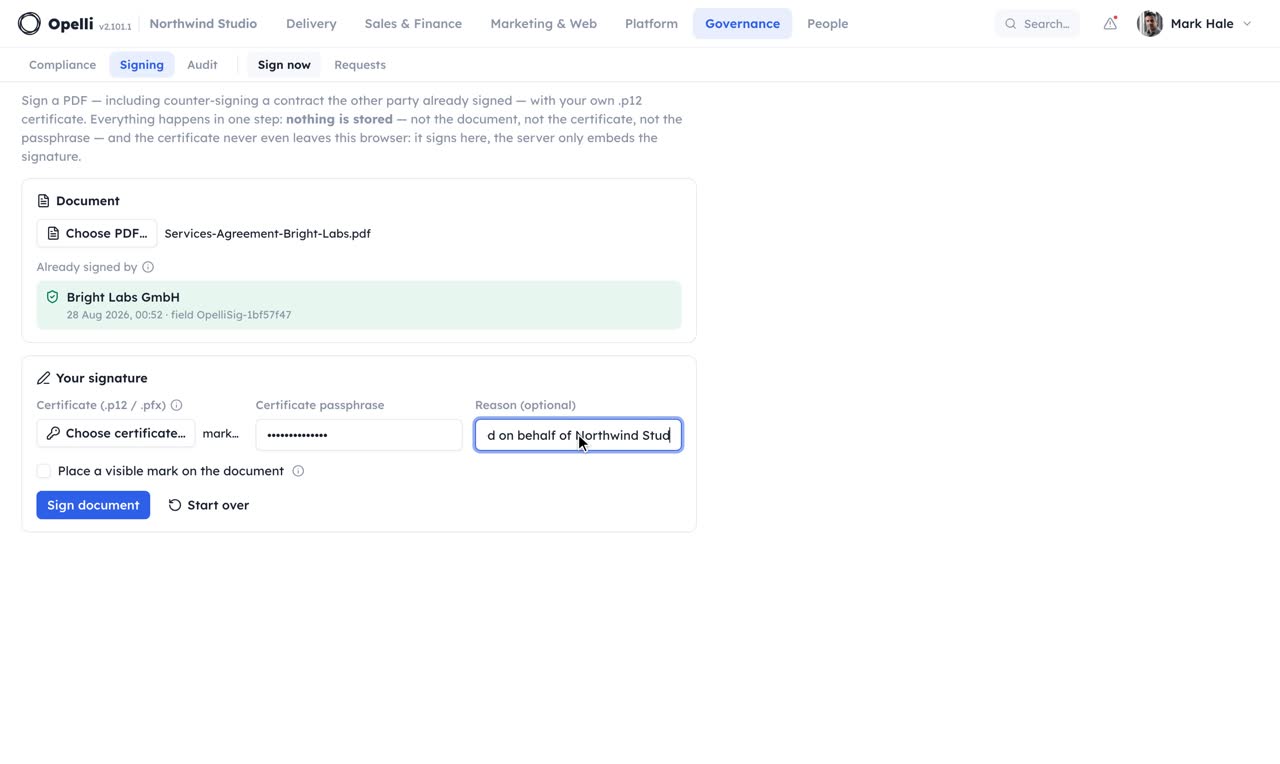
Sign a PDF with your own certificate, including one the other side has already signed — their signature stays valid, and Opelli never holds your key.
- Their signature survivesA signed document is only ever appended to, never rewritten, so a qualified signature the other party put on it stays intact — the check every recipient's reader makes.
- Nothing is storedThe document, your .p12 certificate and its passphrase travel through one request and the signed PDF comes straight back. No key ever rests on the platform, so a hijacked session has nothing to sign with.
- Timestamped, optionally visibleEvery signature carries a trusted RFC 3161 timestamp, and you can place a "Signed by … via Opelli" mark on the page of your choice.
- Inspect before you signThe screen first lists the signatures already on the document and whether each is still intact. What remains afterwards is an audit entry — the document's fingerprint and the certificate's identity, never key material.
Ask for it
It can read the signatures. It cannot sign.
Ask your assistant to counter-sign and it checks the signatures already on the document, then hands it over: the certificate and its passphrase never pass through an assistant or the platform, so the one who signs is you.
 1:43
1:43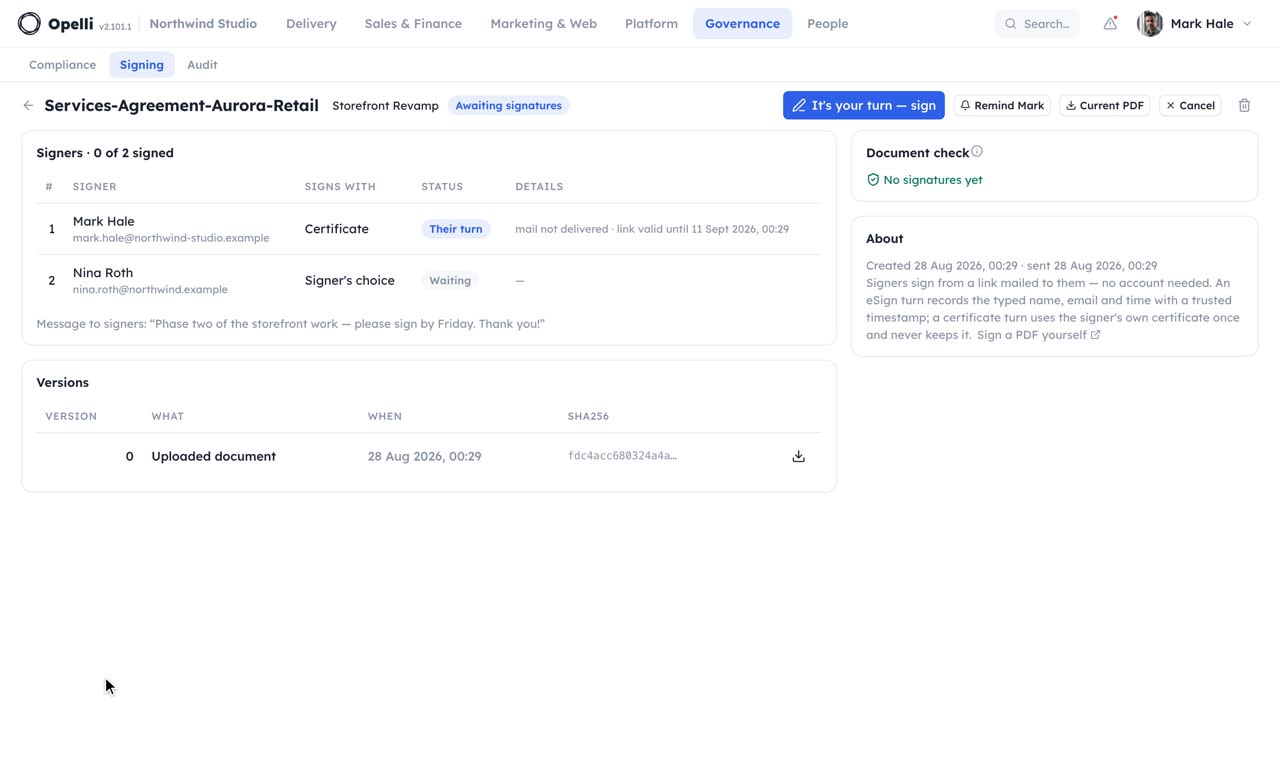 2:31
2:31create_signing_requestUsed send_signing_requestSent. You are first and your link is in your mail. I cannot sign for you: the certificate and its passphrase never pass through me or the platform.
signing_statusUsed remind_signing_requestYour signature is on it since Tuesday; the CFO has not opened hers. Reminder sent.
AI & assistants
Markdown · Agents · MCP
Opelli agents and MCP for the assistant you already use.
Context in Markdown
An assistant is only as good as what it can read.
Opelli writes in Markdown from the start — wiki pages, meeting notes, briefs and reports. The material an assistant needs is the material your team already wrote, in a format a model reads well.
- Export your wiki without losing its structure — and import it back the same way
- Give your assistant the same material your team already works with
- Nothing is locked in: your content stays portable
Part of the platform under every module; see the walkthroughs of the modules it protects.
get_wiki_pageHere is the page with its subpages, headings as breadcrumbs. Tables, checklists and the embedded dataset came through as Markdown too.
Opelli agents
AI prepares. You decide.
Opelli's built-in agents read what is already in the system — a customer conversation, project material — and come back with a suggestion next to the thing it came from. Nothing changes until you accept it.

- Read a conversationGet a summary, the next step with its date, the amounts mentioned and the people named — ready to file on the customer.
- Suggestions, not changesNo record is edited and no deal is moved for you. A drafted page is saved as an unpublished version — the live site changes only when you approve it.
- Under your controlSensitive credentials are removed before content is sent to a model, and administrators can disable individual agents or the entire AI layer.
Administrators see a record of every model call.

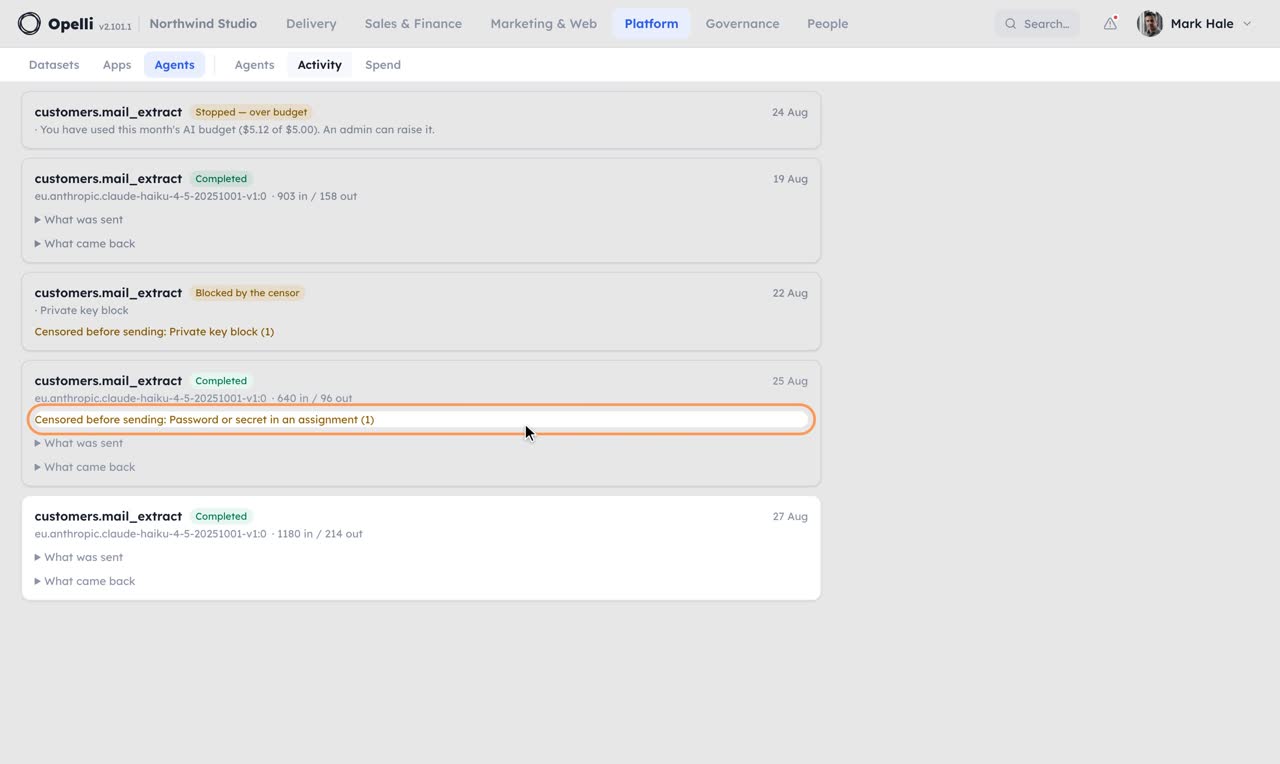
read_mail_with_agentTwo do: Aurora (a proposal by Friday) and Bright Labs (a question about the invoice). The third is a newsletter. Each reading is a proposal on the message; nothing was filed yet.
lookup_personOne strong match on Aurora's own team page, with the source linked and each field's origin recorded. Nothing was invented; the email was not on the page, so it stays empty.
MCP server
Or connect your own AI assistant and just ask.
Opelli speaks the Model Context Protocol. Add Opelli as a connector in Claude, ChatGPT or another MCP-capable assistant and work with projects, tasks, planning, time, customers and published content — more than 90 tools, in plain language.
Catch me up on the latest customer conversation and update the opportunity when I ask.
search_customersupdate_deal
Turn a meeting note into linked tasks without copying decisions by hand.
get_wiki_pagecreate_task
Create a draft launch page from project material; the published version changes only when you approve it.
create_sitepublish_site
And update the Globex opportunity while you're at it.
customers · refused
This connection does not have access to CRM, so I cannot update that opportunity.
Every tool call follows your own permissions: feature permissions, access limited to specific projects, and the rules for guest accounts. How to connect an assistant, and the full security rules, are covered in the documentation.
Part of the platform under every module; see the walkthroughs of the modules it protects.
whoamiUsed list_endpointsNorthwind Studio, as Mark Hale. This key reaches every module; the route list is the real one the server mounts, filtered to this key.
api_requestRefused by name, not quietly allowed. That is what makes "there is no such endpoint" a provable answer.
See it on your own operations.
A short call on your projects and your month, with the assistant you already use connected to a copy of your company.
Thanks — we'll be in touch to find a time.